DubStep Music & Beat Creator
- 4.7
- Rating
- 10.00M
- Installs
- Free
- Price
 Analysis by App-foxy
I like music apps that let me do something within seconds instead of making me study a full production system first. DubStep Music & Beat Creator takes that approach by putting the focus on beatpad-style creation: tap, layer, listen, and adjust until a short dubstep idea starts to feel alive. After spending time with it, I see it less as a replacement for a complete digital audio workstation and more as a quick musical sketchbook for people who want hands-on rhythm making.
The app sits in the Music & Audio category and is developed by Beat Blend Labs. It is free to start, carries an Everyone age rating, and works on devices running Android 6.0 or later. Its current version is 4.1.3, while the app itself was released on June 2, 2020. Those details matter because this is the kind of tool that makes sense on an everyday phone or tablet rather than requiring specialized equipment.
Why the beatpad approach makes the biggest difference
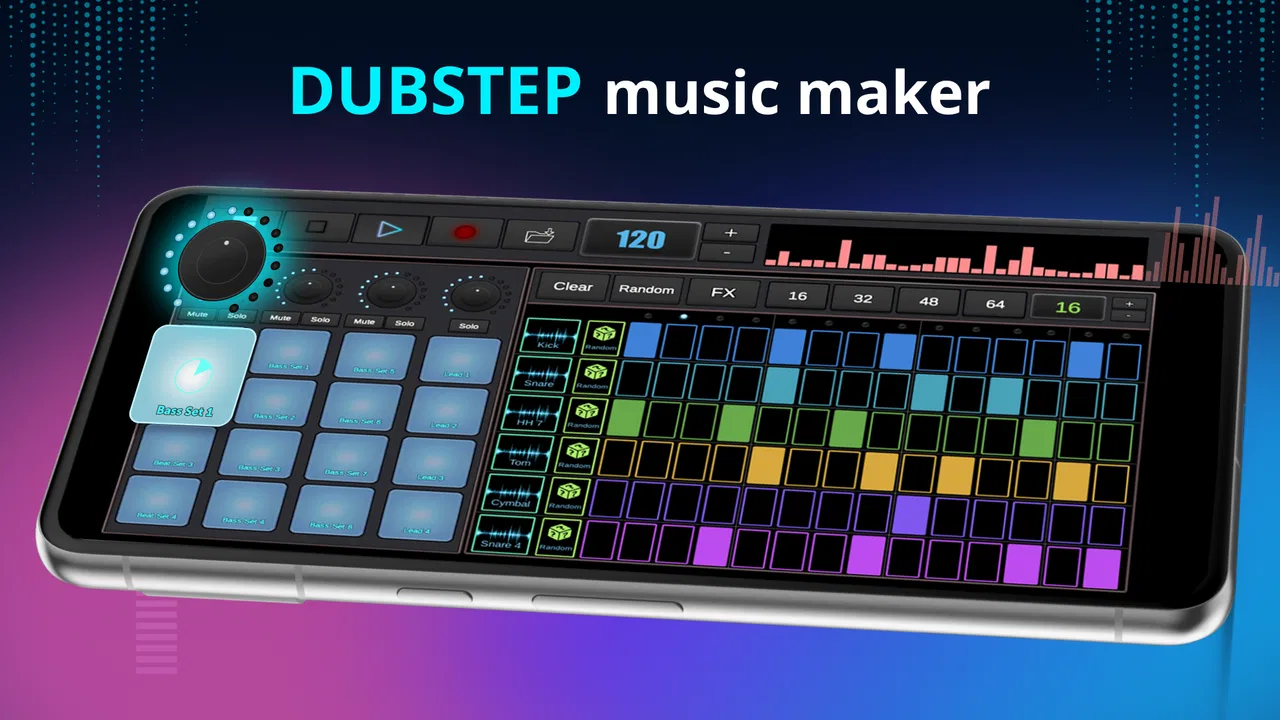
The central capability is the beatpad music creator. Instead of beginning with a blank timeline, a piano-roll editor, or a complicated mixer, I can interact with a set of musical triggers directly. That changes the experience from “compose a track from technical parts” to “perform a rough idea and discover where it goes.” For dubstep, where timing, impact, and contrast are especially important, that immediate response is the app’s strongest quality.
You May Also Like

 Blood Strike: 2.5 Anniversary
Blood Strike’s Loadouts Turn Every Drop Into a Tactical Gamble
A close look at Blood Strike’s custom loadouts: how fast access to signature weapons reshapes its battle royale rhythm, rewards preparation, and narrows the gap between fights.

 Pandora - Music & Podcasts
Pandora’s Music Is Easy to Start, but Harder to Recover
Pandora’s strength is its low-effort path from a seed to a station. Its weak spot is how much confidence it asks you to place in connection, setup, and quiet recovery.

 8 Ball Pool
 Is Built on Rivalries, Rematches, and Routine
A close look at the rivalries, rematches, shared routines, and unanswered safety questions that turn a quick pool match into a persistent mobile community.

 Samsung Music
’s Quiet Strength Is Playing What You Already Own
Its reach comes less from spectacle than from dependable access to a personal library. That simplicity is both the app’s strongest retention engine and its ceiling.

 AccuWeather: Weather Radar
AccuWeather Review: A Quick, Clear Forecast for Everyday Decisions
For everyday plans, the best forecast is the one you can understand quickly. AccuWeather makes rain timing, radar, and local conditions easy to act on, with a few trade-offs.

 Hill Climb Racing
Why Hill Climb Racing Still Turns Crashes Into One More Run
A tiny car, a bumpy hill and one more upgrade: Hill Climb Racing keeps resurfacing because its simple chaos makes every near-miss feel personal.
More From Our News Desk



The real advantage is immediacy: I can test a rhythm by touch before I have decided whether it deserves to become a full song. That makes the app useful during small gaps in the day, when I might have an idea but not enough time or patience to open a more demanding production app. It also lowers the barrier for someone who understands the energy of electronic music but does not yet know how to arrange a complete track.
That simplicity is not the same as unlimited creative control. A beatpad naturally encourages short, repeatable patterns and live triggering. It is excellent for finding a groove, experimenting with combinations, and building confidence. It is less suitable when the goal is detailed editing of every note, precise sound design, or a long arrangement with many carefully automated changes.
What using the creator feels like
My preferred way to use it is to begin with one rhythm rather than tapping everything at once. I listen for the pulse, add a contrasting hit, and then bring in a heavier element only after the basic pattern feels stable. This sounds obvious, but it makes a noticeable difference: the pad layout can invite frantic tapping, while a slower approach produces ideas that are easier to remember and develop.
I also treat each session as a performance experiment instead of expecting a finished release. The app is at its best when I use it to answer questions such as, “Does this rhythm feel too busy?” or “Would this drop work better if I leave a gap before it?” Those are musical decisions, and the tactile format makes them easier to explore than typing notes into a traditional editor.
A useful habit is to create a small structure mentally before touching the pads. I usually think in three moments: an opening pattern, a busier section, and a return to the main beat. Even without turning that plan into a complex arrangement, it gives the session direction. Otherwise, the experience can become a collection of disconnected sounds that are individually exciting but do not work together.
A practical workflow for short sessions
For a quick session, I would start with the least crowded combination of pads available, establish a repeatable pulse, and then test one change at a time. If a new sound makes the rhythm feel better, I keep it; if it only makes the pattern louder or more crowded, I remove it. This simple filter is more useful than chasing constant novelty.
When I want to remember a promising idea, I focus on its defining moment rather than trying to perfect the whole performance. That might be the transition into a heavier section or the contrast between a sparse opening and a dense ending. A short idea with a clear identity is more valuable than a longer session that I cannot reconstruct later.
Another practical tip is to use headphones when judging whether parts fit together. Phone speakers can make a busy electronic pattern feel flatter or less separated, while headphones reveal whether several sounds are competing for attention. I would not use the app as the final judge of a professional mix, but headphones make the creative decisions more reliable.
Where it fits beside regular music-making apps
Compared with a full digital audio workstation, this app is much easier to approach. A workstation usually gives me deeper control over recording, editing, effects, and arrangement, but that flexibility comes with menus, tracks, and a learning curve. DubStep Music & Beat Creator removes much of that setup so I can concentrate on tapping patterns and hearing immediate results.
Compared with a standard drum machine, its appeal is the dubstep-oriented performance mindset. A conventional drum machine may be better for constructing a carefully sequenced beat, while this app feels more natural when I want to trigger ideas in the moment. The trade-off is that the beatpad format may feel restrictive if I prefer drawing every hit into a grid.
It also differs from streaming or radio apps because the purpose is not passive listening. I am not opening it to discover a playlist; I am opening it to make a small musical response myself. That distinction makes it a good companion for a beginner who wants to participate rather than simply consume music.
The best everyday scenario
The most convincing use case for me is a short break when I have an idea for a rhythm but no instrument nearby. I can open the app, try a few combinations, and decide whether the idea has enough energy to keep working on. Even if the result never becomes a complete track, the session turns a vague thought into something audible.
It can also work well for someone preparing a casual performance or a creative activity with friends. The beatpad format is easier to demonstrate than a complex production interface, and its immediate feedback makes experimentation social. One person can establish a pattern while another suggests a change, creating a simple back-and-forth without needing music theory vocabulary.
For beginners, that low-pressure setting is important. There is no need to understand every part of electronic production before making a recognizable rhythmic idea. I would encourage a new user to spend the first sessions learning which combinations feel balanced, rather than worrying about whether the result sounds like a finished commercial track.
What can slow the experience down
The same simplicity that makes the app approachable can become its main limitation. If I want to adjust a single note with exact timing, reshape a sound in detail, or build a carefully evolving arrangement, I would rather move to a more advanced music-production tool. The beatpad approach is designed around direct interaction, not microscopic control.
There is also a difference between making something enjoyable to tap and making something that holds up as a complete composition. A loop can feel powerful for a short time and still lack development. I found that the app works best when I accept it as a place for sketches and performances, then use another tool if the idea needs serious arranging or mixing.
Because the app is free, it is easy to try without a purchase decision at the beginning. However, in-app purchases range from $0.99 to $99.99 per item. I would recommend checking what an optional purchase adds before spending money, especially if I am only using the app occasionally. The free starting point is useful, but the potential cost range means I would not assume every part of the experience has the same value for every user.
Another trade-off is attention. Beatpad apps encourage repeated tapping, and that can lead me to add more layers simply because they are available. The best results usually come from restraint. If a pattern sounds messy, the solution is often removing one part rather than searching for another sound.
Who will enjoy it most
I think the strongest audience is made up of curious beginners, casual beat makers, and electronic-music fans who want a fast way to experiment. It is also a sensible choice for anyone who finds conventional production software intimidating. The app gives those users a direct connection between touch and rhythm, which can make the first creative steps feel rewarding instead of technical.
More experienced producers may still find a place for it as an idea generator. I would not choose it as my only production environment, but I could use it to test a rhythmic direction before rebuilding the concept in a deeper workstation. That workflow prevents me from spending time arranging an idea that never had a convincing core.
The large user response suggests that this format has broad appeal: the app has passed 10 million installs, with an average rating of 4.8 from around 30 thousand ratings and 874 reviews. Those figures do not change my personal limits for the app, but they do reinforce the impression that its accessible, tap-first design connects with many people.
I would skip it if my priority is professional recording, detailed vocal production, advanced synthesis, or exact control over a long song. I would also look elsewhere if I mainly want to listen to finished dubstep rather than create patterns. In those situations, a full workstation or a listening-focused service would be a better match.
Small choices that improve the results
My first recommendation is to give each session a clear purpose. Decide whether the goal is a bass-heavy idea, a transition, or a simple rhythm to build around. This prevents the common problem of tapping randomly until the session becomes noisy. A narrow goal makes the app feel more musical and less like a soundboard.
Second, leave space deliberately. Dubstep depends heavily on contrast, and a pause can make the next hit feel stronger than another layer would. I found that sparse sections also make it easier to hear whether the main rhythm actually works on its own.
Third, compare patterns at a consistent listening level. Turning the volume up can make almost any combination seem more exciting, but it can hide whether the parts are balanced. Keeping the level steady helps me judge the rhythm rather than being distracted by loudness.
Finally, treat the app as the beginning of a workflow when an idea deserves more attention. I can use the beatpad to identify the hook or rhythmic character, then move to a more detailed tool for arrangement. That division of labor is more realistic than expecting a compact creator app to replace every stage of music production.
My final recommendation
After using DubStep Music & Beat Creator, I would recommend DubStep Music & Beat Creator to anyone who wants an approachable, hands-on way to explore electronic rhythms. Its best quality is not that it turns every session into a finished song; it is that it makes starting easy. I can test a beat quickly, hear the effect of adding or removing a part, and learn through direct interaction.
Beat Blend Labs has aimed the app at immediate beat creation, and that focus is clear. The free entry point, Everyone rating, and support for older Android devices make it easy to try, while the current 4.1.3 release gives users a straightforward way into the experience. I would keep expectations realistic around advanced production and optional purchases, but those caveats do not undermine its main purpose.
For me, the app succeeds as a portable creative spark. It is the right choice when I want to make a quick dubstep sketch, share a rhythmic idea, or practice arranging energy through touch. It is not the right choice when I need a complete studio. If that distinction matches what you want, this is a fun and accessible place to begin.
FAQs for DubStep Music & Beat Creator
01What features does DubStep Music & Beat Creator offer?
DubStep Music & Beat Creator provides a comprehensive suite of features, including a variety of sound packs, effects, and a user-friendly interface for creating beats. Users can layer sounds, adjust tempo, and apply filters to craft unique dubstep tracks. Additionally, the app offers export options to share your creations easily.
02Is DubStep Music & Beat Creator suitable for beginners?
Yes, the app is designed to cater to both beginners and experienced users. It includes easy-to-follow tutorials and an intuitive interface that simplifies the music creation process. Beginners can learn at their own pace, while advanced users can dive deeper into more complex features and sound manipulation.
03Does DubStep Music & Beat Creator require an internet connection?
No, DubStep Music & Beat Creator does not require an internet connection for its primary functions. Users can create and edit tracks offline. However, internet access is needed for downloading additional sound packs, updates, and sharing your music on social platforms or cloud services.
04Are there in-app purchases in DubStep Music & Beat Creator?
Yes, DubStep Music & Beat Creator offers in-app purchases. While the basic version includes a variety of features, additional sound packs and advanced tools can be purchased to enhance the music creation experience. This model allows users to customize their toolset according to their needs and budget.
05Can I export my tracks from DubStep Music & Beat Creator?
Absolutely, the app allows you to export your tracks in various formats such as MP3 and WAV. This feature ensures that you can share your music across different platforms, including social media and music streaming services, with ease. Export settings can be adjusted for quality and file size preferences.
Pros
- User-friendly interface for beginners
- Wide variety of sound effects available
- Real-time beat mixing capability
- High-quality audio export options
- Regular updates with new features
Cons
- Limited free version features
- Occasional in-app ads can be intrusive
- Requires internet for some functionalities
- Advanced features need a steep learning curve
- Battery consumption is relatively high

DubStep Music & Beat Creator
Gallery